MetaTrader 5 · XAUUSD and everything else
Four lines of text. Twenty-five order tickets.
TradeSeeder turns the signal into the trade: zone entries, split targets, one stop, and every lot sized from the risk you set once.
$19 / month after the trial · cancel in one click · 7 days money back
By hand
Gold sell now 4302-4305

SL 4309

TP1 4298
TP2 4296
TP3 4294
TP4 4292
TP5 open
- Work out the lot from the stop distance
- Open a ticket. Type price, volume, stop, target
- Repeat twenty-four more times
- Watch the first target and move every stop yourself
With TradeSeeder
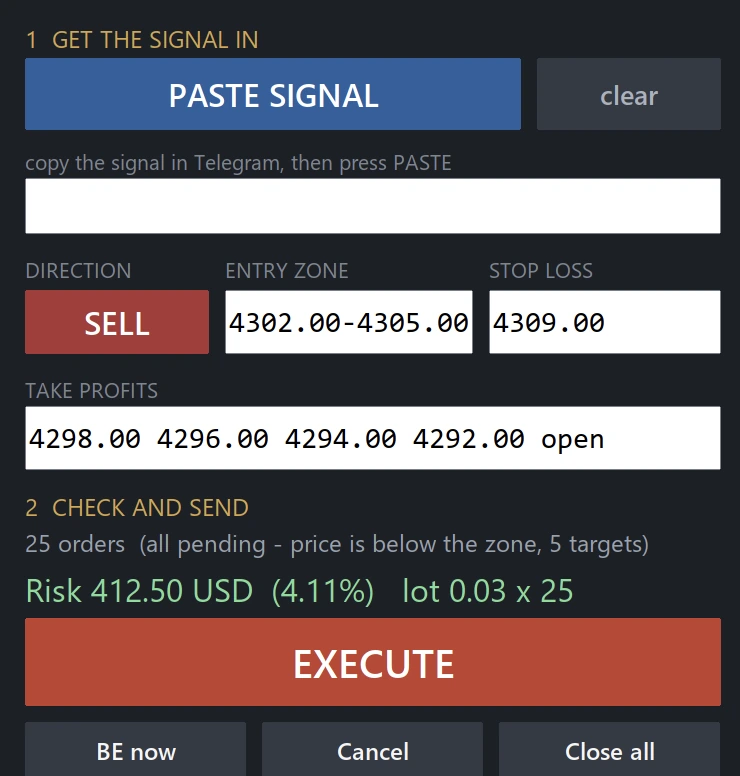
The result
One click, and the account looks like this
Every ticket sized, priced and stopped. Nothing typed twice, nothing left half-entered because a candle moved while you were on order nine.
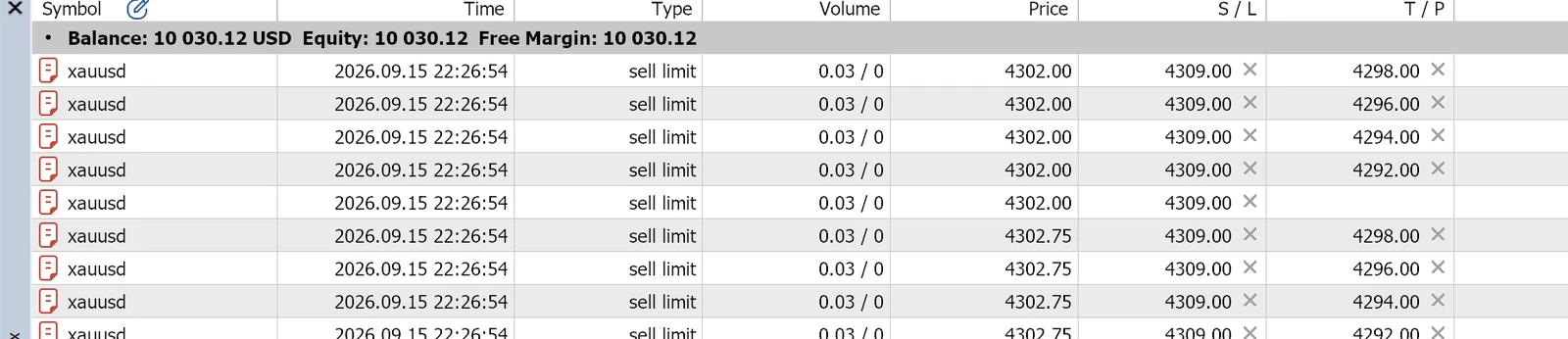
Twenty-five sell limits, 0.03 lots each, one stop at 4309.00, targets laddered 4298 / 4296 / 4294 / 4292, one runner left open.
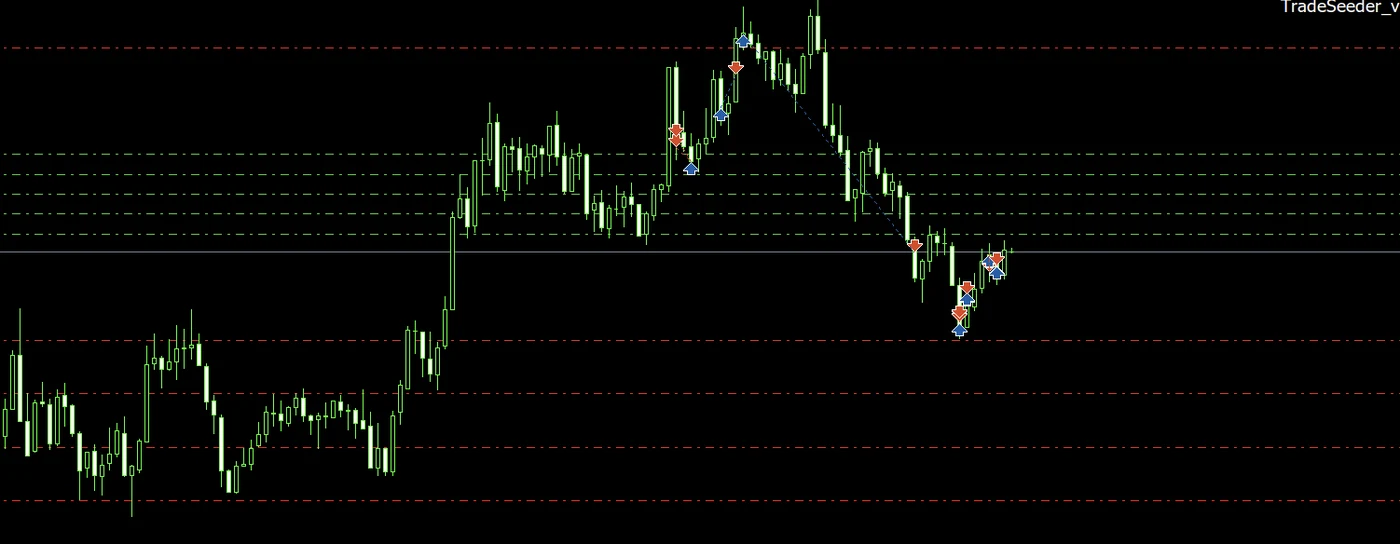
The same trade on the chart — zone, stop and every target where you can see them.
Why it exists
Three things MetaTrader will not do for you
One take-profit per position
MT5 gives a position a single target. Taking a signal with three or four means placing separate orders and tracking them yourself. TradeSeeder splits the trade and keeps the parts together.
No sizing from risk
A zone entry with several orders and one stop needs the lot solved backwards from the money you are willing to lose. TradeSeeder does that, and shows you the figure before anything is sent.
Nothing moves the stop
When the first target pays, the stop should go to entry and the unfilled orders should go away. TradeSeeder does both, and it does them whether or not you are at the screen.
Set once
Your risk rule lives in the settings, not in your head
Percentage of balance, fixed money or fixed lots. How many entries to spread across the zone. What happens when the first target pays. Set it the day you install it and it holds for every signal after that.
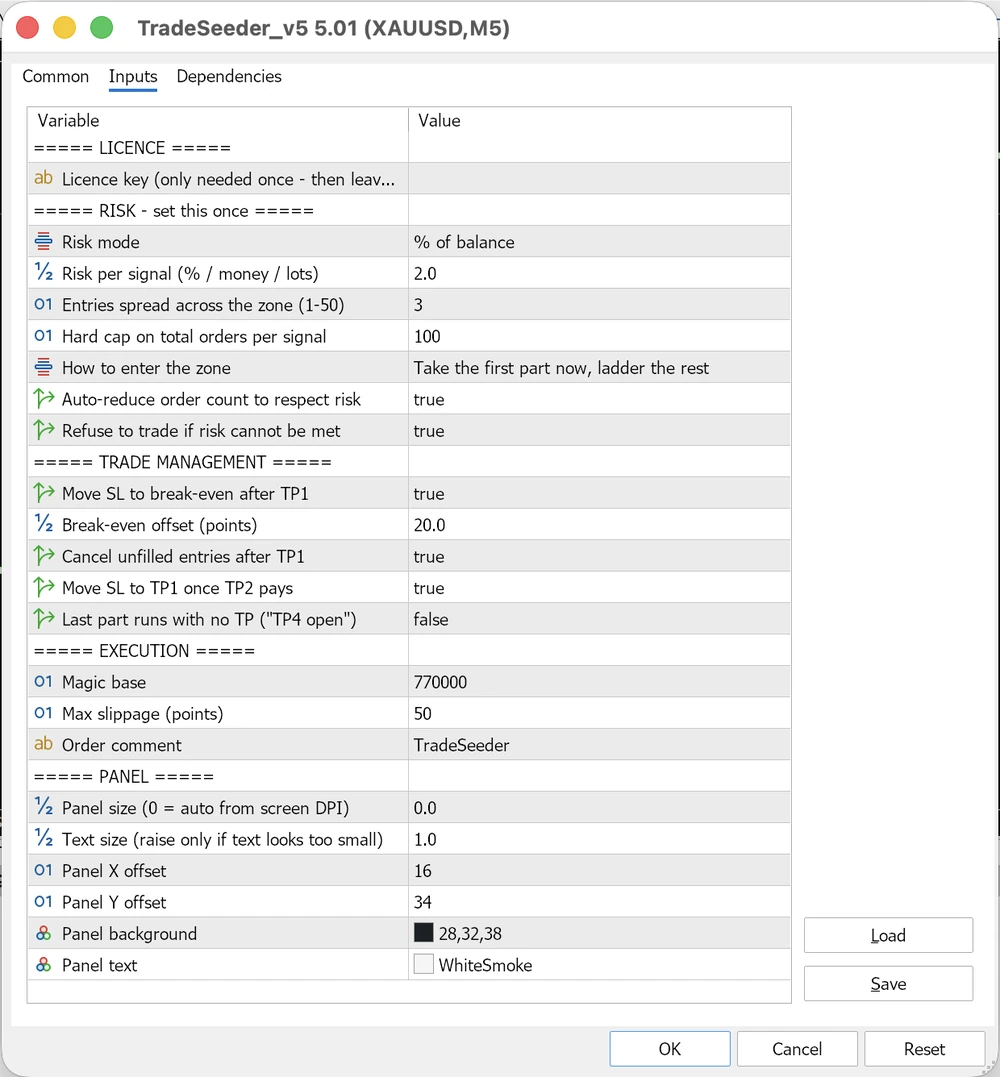
Every rule the EA follows, in one dialog — risk, entries, break-even, runner.
The safety net
It will not let you over-risk the account
Orders at the broker minimum on a small account can add up to more risk than you meant to take — on gold it easily runs past ten per cent. TradeSeeder works out the smallest possible risk for the signal in front of it, and if that is still above your limit it reduces the number of targets, then the number of entries, until it fits. It tells you what it dropped.
If even a single order at the minimum lot is too much, it refuses to trade and says so, rather than quietly sending it.
You stay in charge. Nothing reads your channels and nothing trades while you sleep. You decide which signal to take; TradeSeeder does the arithmetic and the clicking. No VPS, no Telegram session, no bot with access to your account.
Pricing
Cheaper than the signals it executes
One tier, every feature, one trading account. Your card is taken but nothing is charged for seven days, and cancelling is one click. A licence belongs to one MT5 account; if your broker closes it, email us and we move it across.
per month
- Paste the whole signal, check the risk, press Execute
- Lot size worked out from your risk % — never in your head
- Order count reduced automatically to fit that risk
- Up to 50 entries across the zone, TP1–TP10 plus a runner with no target
- Stop to break-even after TP1, locked at TP1 once TP2 pays
- Unfilled entries cancelled once the first target hits
- Break-even, cancel and close-all buttons
- Refuses the trade rather than guess when a signal is stale or over your risk
Plus VAT where it applies — the exact amount is shown at checkout before you pay, and a VAT-registered business can enter its number to have it removed.
Card required, nothing charged for 7 days. Cancel in one click any time. After that, 7 days money back, no questions asked.
Setup
About a minute
- Copy TradeSeeder.ex5 into the MQL5 > Experts folder.
- In MetaTrader open Tools > Options > Expert Advisors, tick Allow WebRequest for listed URL and add this site’s address. MetaTrader blocks the licence check without it.
- Restart MetaTrader and drag TradeSeeder onto a chart.
- Paste your licence key, set your risk percentage, and leave both alone.
- Copy a signal in Telegram, press PASTE on the panel, glance at the risk line, press EXECUTE.
The user guide covers all of it, including what to do when TradeSeeder refuses to place a trade.
Questions
Before you buy
- Does it read my Telegram channels?
- No. You paste the signal, or type the levels. That is deliberate — nothing runs unattended and nothing needs your Telegram account.
- Which brokers and instruments?
- Any MetaTrader 5 broker and any symbol. It was built around XAUUSD because that is where most signals are, but nothing in it is gold-specific. Split targets need a hedging account; on a netting account the parts would merge, so the EA checks and tells you.
- Can I move it to another account?
- A licence belongs to the first MT5 account it runs on and stays there — that is what stops one licence being passed around. If your broker closed the account or you moved from demo to live, email us and we will move it across.
- Do I have to type the licence key on every chart?
- No, once. The EA stores the key in MetaTrader's shared data folder, so every other chart and every other terminal on that machine picks it up on its own. Leave the setting empty and it finds it.
- What happens if I stop paying?
- It stops opening new trades. Positions already open keep their stops and targets and are never abandoned mid-trade. If a card just fails, you get five more days before anything changes.
- Does it work offline?
- It checks the licence hourly and keeps running for 72 hours if it cannot reach us — a weekend or an outage will not interrupt you.
- Is there a refund?
- Cancel during the seven free days and you are charged nothing at all. If you are charged and change your mind, you have seven days to ask for the money back, no questions asked. The full terms are in the Refund Policy.